tags:
- go
- backend
Go Hello World
package main

import "fmt"

func main() {
	fmt.Println("Hello, world!")
}
Why Go?
![[Pasted image 20260215122915.png]]
Dependency tracking
When we try to import other packages which are part of other modules, we need to manage those dependency.
This tracking is done through go.mod file. this file will track the modules that provides the external packages and stays inside the source code repo.
To enable the tracking by creating go.mod need to run go mod init [module_path] command. The module path will be repo location where source code is present. https://go.dev/ref/mod#module-path
Include External Package
pkg.go.dev contains all the published modules whose packages have functions which can be used in code. Packages are pubilshed in modules like one module is rsc.io/quote.
Below is the code to use quote package in own code
package main

import "fmt"

import "rsc.io/quote"

func main() {
    fmt.Println(quote.Go())
}
Go will add this quote module as a requirement and a go.sum fie to use as authenticating the module.
go.sum - This fill will contain the hashes of the module’s direct and indirect dependencies.
Each line in the go.sum has three space separated fields.
rsc.io/quote v1.5.2 h1:w5fcysjrx7yqtD/aO+QwRjYZOKnaM9Uh2b40tElTs3Y=
rsc.io/quote v1.5.2/go.mod h1:LzX7hefJvL54yjefDEDHNONDjII0t9xZLPXsUe+TKr0=
- module path
- version - if the version ends with
/go.modthe hash is for the module’s go.mod file otherwise hash is for the module’s zip file. - hash - it consists of algo name(like h1) and a base64-encoded cryptographic hash separated by
:
go mod tidy - this command will add missing hashes and will remove unnecessary hashes from the go.sum
Compilation Process
![[Pasted image 20260215123258.png]]
Two Kinds of Errors
Generally speaking, there are two kinds of errors in programming:
- Compilation errors. Occur when code is compiled. It's generally better to have compilation errors because they'll never accidentally make it into production. You can't ship a program with a compiler error because the resulting executable won't even be created.
- Runtime errors. Occur when a program is running. These are generally worse because they can cause your program to crash or behave unexpectedly.
Packages
Every go program is made using packages. Execution start in the package main . By conventions, the package name is the same as the last element of the import path. For example math/rand package is comprise files that begin with the statement package rand
package main

import (
	"fmt"
	"math/rand"
)

func main() {
	fmt.Println("My favorite number is", rand.Intn(10))
}
Imports
below code uses multiple imports into a parenthesized “factored” import statement.
Using factored import statement is good style.
package main

import (
	"fmt"
	"math"
)

func main() {
	fmt.Printf("Now you have %g problems.\n", math.Sqrt(7))
}
Exported Names
a name is exported if it begins with a capital latter. For example Pizza or Pi are exported names. pizza and pi don’t start with capital letter, so they are not exported.
When you import a package you can only use it’s exported names any un-exported names are not accessible from outside the package.
package main

import (
	"fmt"
	"math"
)

func main() {
	fmt.Println(math.pi) // Will return undefined error
	fmt.Println(math.Pi)
}
Basic Types
boolstringint (refers to 64), int8, int16, int32, int64uint (refers to 32), uint8, uint16, uint32, unit64, uintptrbyte- alias foruint8rune- alias forint32Unicode code pointfloat32 float64complex64 complex128
int uint and uintptr are usually 32 bit wide on 32 bit systems and 64 bit wide on 64-bit systems.
[!important]
When required integer value always useinttype unless require to use sized or unsigned integer types.
package main

import (
"fmt"
"math/cmplx"
)

func main() {
	var (
		ToBe bool = false
		MaxInt uint64 = 1<<64 - 1
		z complex128 = cmplx.Sqrt(-5 + 12i)
	)
	fmt.Printf("Type: %T Value: %v\n", ToBe, ToBe)
	fmt.Printf("Type: %T Value: %v\n", MaxInt, MaxInt)
	fmt.Printf("Type: %T Value: %v\n", z, z)
}

// OutPut
// Type: bool Value: false
// Type: uint64 Value: 18446744073709551615
// Type: complex128 Value: (2+3i)
As given in above example variable declaration also be factored into blocks same as import.
Zero Values
Variables declared without providing initial explicit value are given their zero value. The zero value is:
0for numeric types,falsefor the boolean type, and""(the empty string) for strings
package main

import "fmt"

func main() {
	var i int
	var f float64
	var b bool
	var s string
	fmt.Printf("%v %v %v %q\n", i, f, b, s) // 0 0 false ""
}
Type conversations
The expression T(v) converts the value v to the type T.
package main

import (
	"fmt"
	"math"
)

func main() {
	var x, y int = 3, 4
	var f = math.Sqrt(float64(x*x + y*y))
	// f := math.Sqrt(x*x + y*y) -> This will give error as we are passing int to Sqrt which requires float64 value
	// var z uint = uint(f)
	z := unit(f)
	fmt.Println(x, y, z)
}
Unlike in C, in Go assignment between items of different type requires an explicit conversion. Try removing the float64 or uint conversions in the example and see what happens.
Type inference
When declaring a variable without specifying an explicit type (either by using the walrus operator := syntax or var = expression syntax), the variable's type is inferred from the value on the right hand side.
When the right hand side of the declaration is typed, the new variable is of that same type:
var i int
j := i // j is an int
When the right hand side contains an untyped numeric constant, the new variable may be an int, float64, or complex128 depending on the precision of the constant:
i := 42           // int
f := 3.142        // float64
g := 0.867 + 0.5i // complex128
Variables
To create variables we can use var statement and pass name of variables as list same as function argument list type will be last.
Variables can be at function or at package level.
package main

import "fmt"

var c, python, java bool

func main() {
	var i int
	fmt.Println(i, c, python, java)
}
Variable declaration can include initializers, one per value. If initializer is present we can omit the type, the variable will take the type of initializer.
package main
import "fmt"

var i, j int = 1, 2

func main() {
	var c, python, java = true, false, "no!"
	fmt.Println(i, j, c, python, java)
}
Short variable declarations
In functions we can use walrus operator := short assignment statement instead of var declaration with implicit type.
[!imp] Outside a function, every statement begins with a keywords only so we can’t use
:=construct.
import "fmt"

func main() {
	k := 5
	fmt.Println(k)
}
Constants
Constants are declared like variables, but with the const keyword.
Constants can be character, string, boolean, or numeric values.
Constants cannot be declared using the := syntax.
package main

import "fmt"

const Pi = 3.14

func main() {
	const World = "世界"
	fmt.Println("Hello", World)
	fmt.Println("Happy", Pi, "Day")

	const Truth = true
	fmt.Println("Go rules?", Truth)
}
Numeric Constants
Numeric constants are high-precision values.
An untyped constant takes the type needed by its context.
(An int can store at maximum a 64-bit integer, and sometimes less.)
package main

import "fmt"

const (
	// Create a huge number by shifting a 1 bit left 100 places.
	// In other words, the binary number that is 1 followed by 100 zeroes.
	Big = 1 << 100
	// Shift it right again 99 places, so we end up with 1<<1, or 2.
	Small = Big >> 99
)

func needInt(x int) int { return x*10 + 1 }
func needFloat(x float64) float64 {
	return x * 0.1
}

func main() {
	fmt.Println(needInt(Small))
	fmt.Println(needFloat(Small))
	fmt.Println(needFloat(Big))
	fmt.Println(needInt(Big)) // This line will cause error as int only takes upto 64-bit integer and this is bigger than it so throws overflow error
}
Computed Constants
constants can be computed as long as the computation can happen at compile time.
For example, this is valid:
const firstName = "Lane"
const lastName = "Wagner"
const fullName = firstName + " " + lastName
That said, you cannot declare a constant that can only be computed at run-time like you can in JavaScript. This breaks:
// the current time can only be known when the program is running
const currentTime = time.Now()
Comments
Go has two styles of comments:
// This is a single line comment

/*
  This is a multi-line comment
  neither of these comments will execute
  as code
*/
Formatting Strings in Go
Go follows the printf tradition from the C language. In my opinion, string formatting/interpolation in Go is less elegant than Python's f-strings, unfortunately.
- fmt.Printf() - Prints a formatted string to standard out.
- fmt.Sprintf() - Returns the formatted string
Default Representation
The %v variant prints any value in a default format. It can be used as a catchall.
s := fmt.Sprintf("I am %v years old", 10)
// I am 10 years old

s := fmt.Sprintf("I am %v years old", "way too many")
// I am way too many years old
If you want to print in a more specific way, you can use the following formatting verbs:
String
s := fmt.Sprintf("I am %s years old", "way too many")
// I am way too many years old
Integer
s := fmt.Sprintf("I am %d years old", 10)
// I am 10 years old
Float
s := fmt.Sprintf("I am %f years old", 10.523)
// I am 10.523000 years old

// The ".2" rounds the number to 2 decimal places
s := fmt.Sprintf("I am %.2f years old", 10.523)
// I am 10.52 years old
If you're interested in all the formatting options, you can look at the fmt package's docs.
Conditional Statements
If
Go's if statements are like its for loops; the expression need not be surrounded by parentheses ( ) but the braces { } are required.
[!note] Unlike other languages, you must put the opening brace on the same line as the condition and not on a new line.
package main

import (
	"fmt"
	"math"
)

func sqrt(x float64) string {
	if x < 0 {
		return sqrt(-x) + "i"
	}
	return fmt.Sprint(math.Sqrt(x))
}

func main() {
	fmt.Println(sqrt(2), sqrt(-4))
}
If with a short statement
Like for, the if statement can start with a short statement to execute before the condition.
Variables declared by the statement are only in scope until the end of the if.
package main

import (
	"fmt"
	"math"
)

func pow(x, n, limit float64) float64 {
	if v := math.Pow(x, n); v < limit {
		return v
	}
	return limit
	// return v - this will return error as v is out of scope
}
func main() {
	fmt.Println(
		pow(3, 2, 10),
		pow(3, 4, 20),
	)
}
If and else
Variables declared inside an if statement also available inside any of the else blocks.
In below code both calls to pow return their results before the call to fmt.Println in main begins.
package main

import (
	"fmt"
	"math"
)

func pow(x, n, lim float64) float64 {
	if v := math.Pow(x, n); v < lim {
		return v
	} else {
		fmt.Printf("%g >= %g\\n", v, lim)
	}
	// can't use v here, though
	return lim
}

func main() {
	fmt.Println(
		pow(3, 2, 10),
		pow(3, 3, 20),
	)
}
Switch
A switch statement is a shorter way to write a sequence of if - else statements. It runs the first case whose value is equal to the condition expression.
Go's switch is like the one in C, C++, Java, JavaScript, and PHP, except that Go only runs the selected case, not all the cases that follow. In effect, the break statement that is needed at the end of each case in those languages is provided automatically in Go. Another important difference is that Go's switch cases need not be constants, and the values involved need not be integers.
Switch cases evaluate cases from top to bottom, stopping when a case succeeds.
If you do want a case to fall through to the next case, you can use the fallthrough keyword.
package main

import (
	"fmt"
	"runtime"
	"time"
)

func main() {
	fmt.Print("Go runs on ")
	switch os := runtime.GOOS; os {
	case "windows":
		fmt.Println("It's Windows baby...")
	case "linux":
		fmt.Println("Linux boss...")
	case "macOS":
        fallthrough
    case "Mac OS X":
        fallthrough
	case "darwin":
		fmt.Println("It's OS X")

	default:
		fmt.Printf("%s\\n", os)
	}

	fmt.Println("When's Saturday?")
	today := time.Now().Weekday()
	switch time.Saturday {
	case today + 0:
		fmt.Println("It's today babyy..")
	case today + 1:
		fmt.Println("It's tomorrow..")
	case today + 3:
		fmt.Println("It's in three days")
	default:
		fmt.Println("Too far..")
	}
}
Switch with no condition
Switch without a condition is the same as switch true.
This construct can be a clean way to write long if-then-else chains.
Functions
A function can take zero or more arguments. Also in Go type comes after the variable name. Go’s declarations read left to right.
- Why go uses types after variable name? https://go.dev/blog/declaration-syntax
func add(a int, b int) int {
	return a + b
}
If two or more parameters have same time then we can omit the type from all the parameter and specify only for last one
func add(a, b int) int {
	return a + b
}
A function can return multiple values also
func swap(x, y string) (string, string) {
	return y, x
}

func main() {
	a, b := swap("hello", "world")
	fmt.Println(a, b)
}
Ignoring Return Values
A function can return a value that the caller doesn't care about. We can explicitly ignore variables by using an underscore, or more precisely, the blank identifier _.
Named Return values
In Go return values can be named and they are treated as variables inside function and defined at the top of the function.
A return statement without arguments returns the named return values. This known as a “naked” return.
[!important]
Naked return should be used only in short functions, they can harm readability in longer functions.
func split(num int) (x, y int) {
	x = num * 4 / 9
	y = num - x
	return
}

split(17)
Anonymous Functions
// Below is the syntax to create anonymous function
// It will only used in passing it as function argument which expect function
func(a int) int {
	return a + a
}
Defer
It allows a function to be executed automatically just before its enclosing function returns
In deferred call the arguments are evaluated immediately but the function call is not executed until the surrounding function returns.
Usually this is used for the cleanup purpose, defer is often used where finally or ensure are used in other languages.
package main

import "fmt"

func main() {
	func main() {
	ans := 10
	defer fmt.Println("Here defer", ans)
	ans = 100
	fmt.Println("Here", ans)
}

/*
	Output:
		Here 100
		Here defer 10
*/
defer is simple and behaviour is straightforward, there are 3 simple rules:
- A deferred function’s arguments are evaluated when the defer statement is evaluated.```
func a() {
    i := 0
    defer fmt.Println(i)
    i++
    return
}
- Deferred function calls are executed in Last In First Out order after the surrounding function returns. This function prints “3210”:
func b() {
    for i := 0; i < 4; i++ {
        defer fmt.Print(i)
    }
}
- Deferred functions may read and assign to the returning function’s named return values. In this example, a deferred function increments the return value i after the surrounding function returns. Thus, this function returns 2:
func c() (i int) {
    defer func() { i++ }()
    return i
}
Multiple Defers
The location of a defer statement inside a function matters. The deferred call is registered at the point where defer is executed, and it will run when the function returns. If you have multiple defer statements in a single function, they are executed in last-in, first-out order (the last deferred call runs first).
For loop
Go has only one looping construct for loop
The basic for loop has three components separated by semicolons:
- the init statement: executed before the first iteration
- the condition expression: evaluated before every iteration
- the post statement: executed at the end of every iteration
The init statement will often be a short variable declaration, and the variables declared there are visible only in the scope of the for statement.
[!note]
Unlike other languages like C, Java, or JavaScript there are no parentheses surrounding the three components of theforstatement and the braces{ }are always required.
package main

import "fmt"

func main() {

	var sum int
	for i := 0; i < 10; i++ {
		sum += i
	}
	fmt.Println("Sum is: ", sum)
}
[!note] The initial and post statements are optional in for loop
package main

import "fmt"

func main() {
	sum := 1
	for ; sum < 1000; {
		sum += sum
	}
	fmt.Println(sum)
}
Now this is same like while loop in C. you can drop the semicolons and it will be same as C's while loop. C's while is spelled for in Go.
package main

import "fmt"

func main() {
	sum := 1
	for sum < 1000 {
		sum += sum
	}
	fmt.Println(sum)
}
Forever
If you emit the conditions the loop will run continuously, so infinite loop is compactly expressed.
package main

func main() {
	for {
	}
}
Structs
We use structs in Go to represent structured data. It's often convenient to group different types of variables together.
We can define struct using type <struct_name> struct . We can access any filed of struct using dot.
package main

import "fmt"

type Vertax struct {
	X int
	Y int
	Z string
}

func main() {
	v := Vertax{1, 5, "Test"}
	fmt.Println(Vertax{4, 5, "Vatsal"})
	fmt.Println(v.X)
	v.Y = 10
	fmt.Println(v.Y)
}
Nested Structs in Go
Structs can be nested to represent more complex entities:
type car struct {
  brand string
  model string
  doors int
  mileage int
  frontWheel wheel
  backWheel wheel
}

type wheel struct {
  radius int
  material string
}
The fields of a struct can be accessed using the dot . operator.
myCar := car{}
myCar.frontWheel.radius = 5
Anonymous Structs in Go
An anonymous struct is just like a normal struct, but it is defined without a name and therefore cannot be referenced elsewhere in the code. To create an anonymous struct, just instantiate the instance immediately using a second pair of brackets after declaring the type:
myCar := struct {
  brand string
  model string
} {
  brand: "Toyota",
  model: "Camry",
}
You can even nest anonymous structs as fields within other structs:
type car struct {
  brand string
  model string
  doors int
  mileage int
  // wheel is a field containing an anonymous struct
  wheel struct {
    radius int
    material string
  }
}

var myCar = car{
  brand:   "Rezvani",
  model:   "Vengeance",
  doors:   4,
  mileage: 35000,
  wheel: struct {
    radius   int
    material string
  }{
    radius:   35,
    material: "alloy",
  },
}
Embedded Structs
Go is not an object-oriented language. However, embedded structs provide a kind of data-only inheritance that can be useful at times. Keep in mind, Go doesn't support classes or inheritance in the complete sense, but embedded structs are a way to elevate and share fields between struct definitions.
type Computer struct {
    brand string
    model string
}

type Laptop struct {
    Computer
    batteryLife int
}

myLaptop := Laptop{
    batteryLife: 8,
    Computer: Computer{
        brand: "Dell",
        model: "XPS",
    },
}

fmt.Println(myLaptop.batteryLife)  // 8
fmt.Println(myLaptop.brand)        // Dell
fmt.Println(myLaptop.model)        // XPS
Struct Methods in Go
While Go is not object-oriented, it does support methods that can be defined on structs. Methods are just functions that have a receiver. A receiver is a special parameter that syntactically goes before the name of the function.
type rect struct {
  width int
  height int
}

// area has a receiver of (r rect)
// rect is the struct
// r is the placeholder
func (r rect) area() int {
  return r.width * r.height
}

var r = rect{
  width: 5,
  height: 10,
}

fmt.Println(r.area())
// prints 50
A receiver is just a special kind of function parameter. In the example above, the r in (r rect) could just as easily have been rec or even x, y or z. By convention, Go code will often use the first letter of the struct's name
Memory Layout
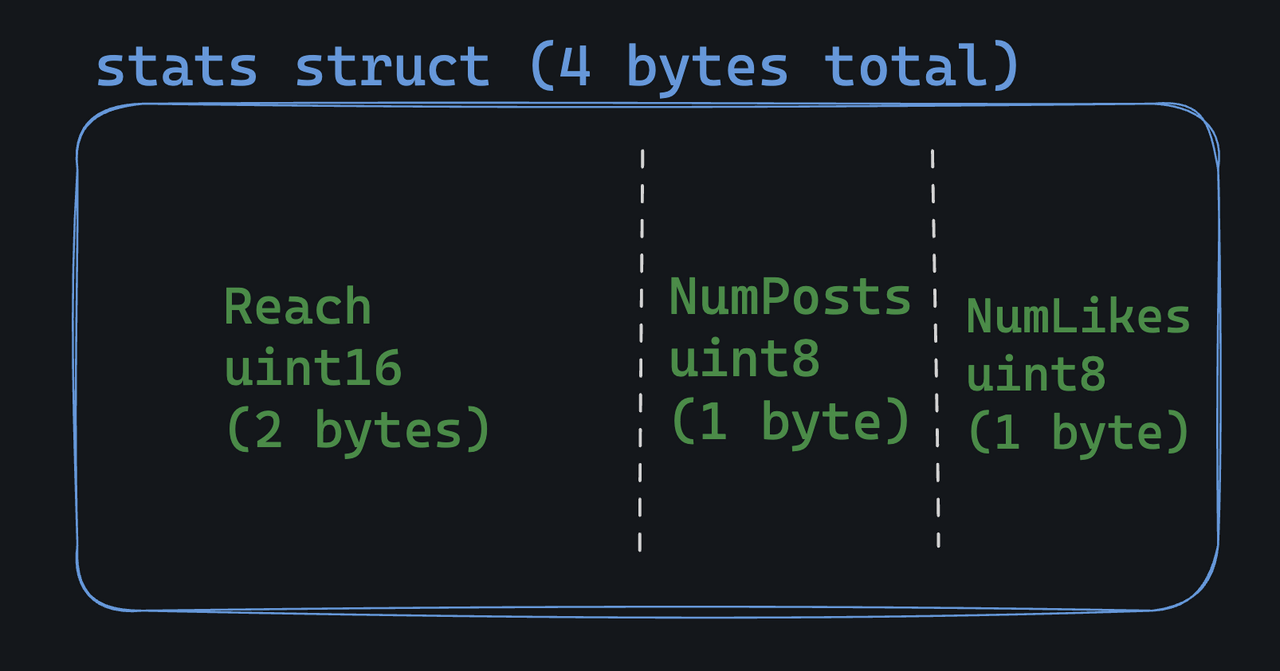
In Go, structs sit in memory in a contiguous block, with fields placed one after another as defined in the struct. For example this struct:
type stats struct {
	Reach    uint16
	NumPosts uint8
	NumLikes uint8
}
Looks like this in memory:
Field ordering... Matters?
the order of fields in a struct can have a big impact on memory usage. This is the same struct as above, but poorly designed:
type stats struct {
	NumPosts uint8
	Reach    uint16
	NumLikes uint8
}
It looks like this in memory:
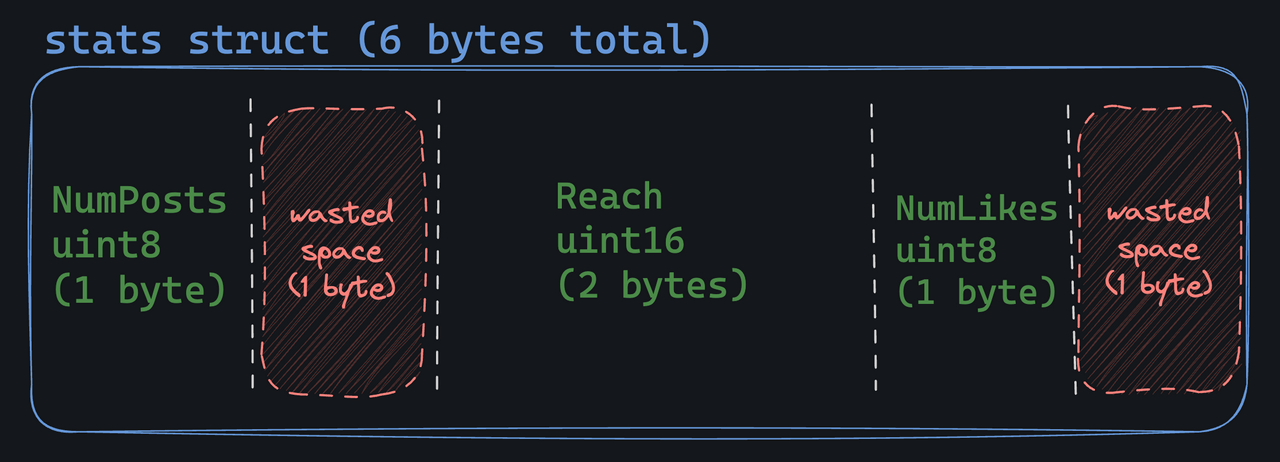
Notice that Go has "aligned" the fields, meaning that it has added some padding (wasted space) to make up for the size difference between the uint16 and uint8 types. It's done for execution speed, but it can lead to increased memory usage.
Should I Panic?
To be honest, you should not stress about memory layout. However, if you have a specific reason to be concerned about memory usage, aligning the fields by size (largest to smallest) can help. You can also use the reflect package to debug the memory layout of a struct:
typ := reflect.TypeOf(stats{})
fmt.Printf("Struct is %d bytes\n", typ.Size())
Empty Struct
Empty structs are used in Go as a unary value.
// anonymous empty struct type
empty := struct{}{}

// named empty struct type
type emptyStruct struct{}
empty := emptyStruct{}
The cool thing about empty structs is that they're the smallest possible type in Go: they take up zero bytes of memory.
Pointers to structs
We can access struct field using a struct pointer.
To access the field X of a struct when we have the struct pointer p we could write (*p).X. However, that notation is cumbersome, so the language permits us instead to write just p.X, without the explicit dereference.
Struct Literals
A struct literal denotes a newly allocated struct value by listing the values of its fields.
You can list just a subset of fields by using the Name: syntax. (And the order of named fields is irrelevant.
The special prefix & returns a pointer to the struct value.
Interface
Interfaces allow you to focus on what a type does rather than how it's built. They can help you write more flexible and reusable code by defining behaviors (like methods) that different types can share. This makes it easy to swap out or update parts of your code without changing everything else.
Interfaces are just collections of method signatures. A type "implements" an interface if it has methods that match the interface's method signatures.
type vehicle interface {
    start()
    stop()
}

type car struct {
    model string
}

func (c car) start() {
    fmt.Printf("%s started\n", c.model)
}

func (c car) stop() {
    fmt.Printf("%s stopped\n", c.model)
}

func operateVehicle(v vehicle) {
    v.start()
    v.stop()
}

func main() {
    myCar := car{model: "Civic"}
    operateVehicle(myCar)
}

// Civic started
// Civic stopped
When a type implements an interface, it can then be used as that interface type.
func printShapeData(s shape) {
	fmt.Printf("Area: %v - Perimeter: %v\n", s.area(), s.perimeter())
}
Because we say the input is of type shape, we know that any argument must implement the .area() and .perimeter() methods.
Implement Interfaces
Interfaces are implemented implicitly.
A type never declares that it implements a given interface. If an interface exists and a type has the proper methods defined, then the type automatically fulfills that interface.
[!tip] A quick way of checking whether a struct implements an interface is to declare a function that takes an interface as an argument. If the function can take the struct as an argument, then the struct implements the interface.
Multiple Interfaces in Go
In Go, a type can implement multiple interfaces. The empty interface interface{} is an example of an interface with no methods, which is therefore implemented by all types. This makes it a versatile tool for holding values of any type. A type fulfills an interface by implementing all its methods, and it can simultaneously fulfill any number of interfaces as long as it satisfies each interface's method set.
type Animal interface {
    Speak() string
}

type Walker interface {
    Walk() string
}

type Dog struct {
    Name string
}

func (d Dog) Speak() string {
    return fmt.Sprintf("%s says: Woof!", d.Name)
}

func (d Dog) Walk() string {
    return fmt.Sprintf("%s is walking.", d.Name)
}

    dog := Dog{Name: "Buddy"}

    var animal Animal = dog
    var walker Walker = dog

    fmt.Println(animal.Speak()) // Animal behavior
    fmt.Println(walker.Walk())  // Walker behavior
Naming Interface Parameters in Go
Interfaces are used to define a set of method signatures. Naming parameters in interface methods provides clarity about what the parameters represent, which enhances code readability and maintainability. Naming return values can also clarify the purpose of the returned data.
Unnamed vs Named Interface Parameters:
Unnamed:
type Copier interface {
    Copy(string, string) int
}
Named:
type Copier interface {
    Copy(sourceFile string, destinationFile string) (bytesCopied int)
}
Type Assertions in Go
A type assertion provides access to an interface's underlying concrete type. It allows you to cast an interface value to its corresponding data structure. This is useful when you need to work with the specific properties of the underlying type. Type assertions are performed using the syntax v, ok := x.(T), where v is the asserted type, ok is a boolean indicating success, and T is the target type.
Type assertion with a circle type:
type shape interface {
	area() float64
}

type circle struct {
	radius float64
}

c, ok := s.(circle)
if !ok {
	// log an error if s isn't a circle
	log.Fatal("s is not a circle")
}

radius := c.radius
Handling multiple types using type assertions:
func getExpenseReport(expense interface{}) (string, float64) {
    if email, ok := expense.(email); ok {
        return email.toAddress, email.cost
    }
    if sms, ok := expense.(sms); ok {
        return sms.toPhoneNumber, sms.cost
    }
    return "", 0.0
Type Switches
A type switch makes it easy to do several type assertions in a series. They are akin to regular switch statements but focus on types rather than values. By using type switches, you can determine the dynamic type of an interface variable and execute code based on that type, allowing for more flexible and robust type handling.
func identifyType(input interface{}) {
    switch value := input.(type) {
    case int:
        fmt.Println("Type is int")
    case float64:
        fmt.Println("Type is float64")
    case string:
        fmt.Println("Type is string")
    default:
        fmt.Println("Unknown type")
    }
}

identifyType(42)      // Type is int
identifyType(3.14)    // Type is float64
identifyType("Go")    // Type is string
identifyType([]int{}) // Unknown type
Errors
Pointers
In Go we have pointers.
The type *T is a pointer to value T. It’s zero value is nil .
var p *int
The & operator generates a pointer to its operand.
i := 42
p = &i
The * operator denotes the pointer's underlying value.
fmt.Println(*p) // read i through the pointer p
*p = 21         // set i through the pointer p
This is known as "dereferencing" or "indirecting".
package main

import "fmt"

func main() {
	i, j := 12, 45

	p := &i
	fmt.Println(*p)
	*p = 27
	fmt.Println(i)

	p = &j
	fmt.Println(*p)
	*p = 99
	fmt.Println(j)
}